Adjust Spray Settings
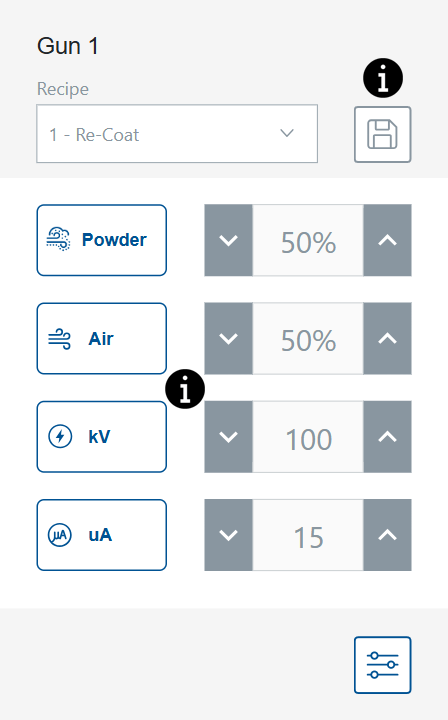
Spray Settings can be adjusted from the Home screen using the toggles. Alternatively, the user can select a Spray Setting button to go to the Control Details screen and adjust the setting from there.
Select any of the  for more information.
Save Recipe
Save any manual adjustments made to a recipe.
Default Factory recipes can only be edited from the Recipes screens. Only the Powder  and Air
  Spray Settings can be edited for default factory recipes.
Spray Settings
Spray settings can be adjusted from the Home and Edit Recipe screens using the toggles. Alternatively, the user can select a Spray Setting button to go to the Gun Details screen and adjust the setting using the scroll bar. For more information of Powder and Air settings, see topics for HD Powder Flow Settings and VT Powder Flow Settings.
| Icon | Label | Description |
|---|---|---|

|
Powder |
Controls the amount of powder delivered from the pump. In VT systems, Flow Air is used to the volume. In HD systems, Flow is controlled by timing valves to adjust volume. |

|
Air |
Atomizing Air Pattern Air |

|
kV The kV (kilovolt) setting determines the voltage output of the spray gun, which charges the powder particles allowing them to adhere to the parts. The kV (kilovolt) setting determines the voltage output of the spray gun, which charges the powder particles allowing them to adhere to the parts.
|
The kV (kilovolt) setting determines the voltage output of the spray gun, which charges the powder particles allowing them to adhere to the parts. |

|
uA One millionth of an amp, the standard unit for measuring electrical current, and represents the current moving through the spray gun to charge the powder particles.
|
One millionth of an amp, the standard unit for measuring electrical current, and represents the current moving through the spray gun to charge the powder particles. |